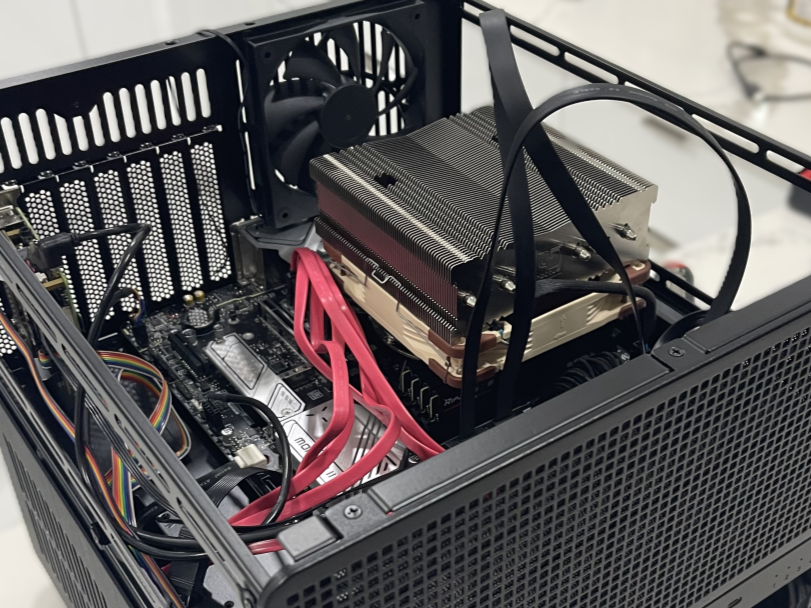
Home Server (NAS + AI Compute Node)
A self-built homelab server for storage, virtualization, AI workloads, and self-hosted applications.
Tools/Technologies: Unraid OS, Docker, KVM/QEMU VMs, ZFS / XFS, Raspberry Pi KVM, GPU Passthrough, Linux, Git (Forgejo), Ollama, ComfyUI
Date: Fall 2024 – Present
Overview
This project is a fully custom-built homelab-server designed to consolidate storage, development workflows, and AI compute into a single highly capable system. It evolved from an early Raspberry Pi Home Assistant setup into a dedicated Unraid-based NAS and virtualization environment providing persistent storage, GPU-accelerated AI workloads, automated backups, cloud services, and containerized apps.
The system enables full control of personal data, supports rapid experimentation with new software, and streamlines development by hosting VMs, Git repositories, and AI tools. Its architecture prioritizes reliability, scalability, and long-term maintainability.
My Role
- Selected and sourced all hardware components, balancing performance with cost by using high-quality refurbished drives and used enterprise components.
- Assembled the full system, including thermal management, cable routing, and power delivery considerations.
- Configured Unraid, including storage pools (XFS and ZFS), Docker networking, VM infrastructure, and GPU passthrough for AI workloads.
- Deployed, maintained, and optimized self-hosted services such as Forgejo (Git), Nextcloud, Home Assistant, Ollama, ComfyUI, Matomo, and various development VMs.
- Implemented backup strategies, automated updates, and monitoring workflows to maintain system uptime and reliability.
Technical Challenges
- Storage Pool Architecture: Balancing XFS for array stability with ZFS for high-performance caching and development workloads required careful pool configuration, redundancy planning, and tuning for mixed I/O patterns.
- GPU Passthrough + AI Stack: Integrating a used RTX 3090 FE into Unraid and configuring container/VM passthrough for Ollama and ComfyUI.
- Virtualization Overhead: Running multiple VMs (Ubuntu, Windows, development sandboxes) demanded fine-tuned CPU pinning, and memory allocation.
- Network Management: Maintaining reliability while handling Docker network isolation, and the use of a Raspberry Pi KVM for off-site management.
Key Design Decisions
- Unraid instead of traditional Linux server: Chosen for ease of array expansion, Docker/VM management, and strong community support, enabling incremental growth.
- Used enterprise hardware (GPU, PSU, HDDs): Significantly reduced cost while maintaining performance; manufacturer-recertified HDDs provided reliability at a fraction of the price.
- Hybrid XFS + ZFS Layout: XFS used for bulk media and archival storage; ZFS used for high-I/O development datasets and VM images to maximize throughput and flexibility.
- Self-hosted services over cloud subscriptions: Provides full data ownership, avoids recurring fees, and enables custom workflows tailored to development, robotics, and AI work.
Results / Outcomes
- Successfully hosts a wide ecosystem of services including AI models, object storage, photo backup, Git repositories, analytics, virtual machines, and development sandboxes.
- Provides reliable high-throughput storage and GPU-accelerated compute for robotics, AI experiments, and embedded systems work.
- Enabled centralized automation and data control, replacing many commercial cloud services.
- Deepened understanding of Linux administration, virtualization, container orchestration, networking, and system-level performance tuning.